Core Objects
- - Circle, Square, Rectangle, Line, Arrow, Dot, Polygon, RegularPolygon
- - Text, Tex, MathTex
- - ImageMobject, SVGMobject
- - Group and VGroup
Runnable examples for the currently supported feature set. Previews are lazy and only compile when you click Render preview, so opening this page does not trigger a flood of compile requests.
Relative and absolute placement helpers.
scene = Scene(fps=30, width=640, height=360)circle = Circle()square = Square()triangle = Triangle()circle.move_to(LEFT * 2)square.next_to(circle, LEFT)triangle.align_to(circle, LEFT)scene.add(circle, square, triangle)scene.wait(1)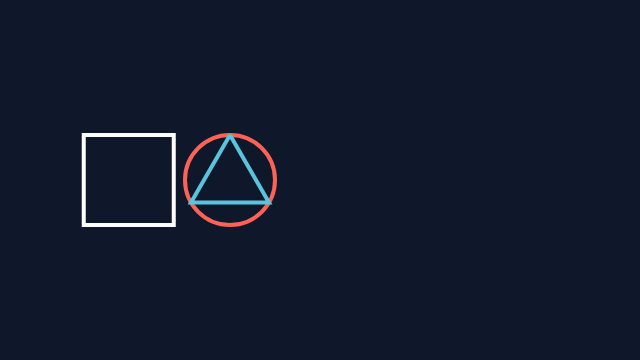
Combine arrange, grid-style grouping, next_to, align_to, and move_to in one layout.
scene = Scene(width=960, height=540, backgroundColor="#020617") def card(shape, label, color): return VGroup( shape.set_color(color), Text(label, font_size=18, color=color), ).arrange(DOWN, buff=0.14) header = Text("Group layout helpers", font_size=30, color=WHITE) top_row = VGroup( card(Circle(radius=0.34), "arrange", BLUE_B), card(Square(side_length=0.68), "aligned", GREEN_B), card(Triangle().scale(0.45), "stack", YELLOW_B),).arrange(RIGHT, buff=0.6, aligned_edge=DOWN) grid_items = VGroup( Dot(color=BLUE).scale(1.2), Square(side_length=0.5, color=GREEN), Triangle(color=YELLOW).scale(0.45), Circle(radius=0.26, color=TEAL), RoundedRectangle(width=0.66, height=0.42, corner_radius=0.12, color=ORANGE), Rectangle(width=0.68, height=0.38, color=PINK),).arrange_in_grid(rows=2, cols=3, buff=(0.4, 0.45)) grid_label = Text("arrange_in_grid", font_size=20, color=GREY_B).next_to(grid_items, UP, buff=0.22).align_to(grid_items, LEFT)footer = Text("next_to + align_to + move_to", font_size=22, color=WHITE).next_to(grid_items, DOWN, buff=0.35).align_to(grid_label, LEFT) layout = VGroup( header, top_row, VGroup(grid_label, grid_items), footer,).arrange(DOWN, aligned_edge=LEFT, buff=0.48)layout.move_to(ORIGIN) scene.add(layout)scene.wait(1.0)